WIAB Dev (Wire-in-a-Box development) Deployment Guide
Introduction
This guide provides detailed instructions for deploying Wire-in-a-Box (WIAB Dev) using Ansible on an Ubuntu 24.04 system. The deployment corresponds to WIAB Dev (previously called WIAB Demo) in the planning overview. It is a single-node, Minikube-based environment intended for functional testing and evaluation only.
This will install the wire-server components including the databases in a fashion ready for development or evaluation. This setup is not recommended for production use, but will get you started with learning the product. This configuration has NO data persistence, as everything is stored in memory and will be lost if restarted. It does not require any external storage solutions to function.
Read the section Cleaning/Uninstalling Wire-in-a-Box to clean the installation once your testing or evaluation is complete.
What will be installed?
- Wire-server (API)
- core - user accounts, authentication, conversations
- assets handling (images, files, …)
- notifications over websocket
- Wire-webapp, a fully functioning web client (like
https://app.wire.com) - Wire-account-pages, user account management (a few pages relating to e.g. password reset), team-settings page
- Email relay service i.e. smtp service
- Calling services i.e. coturn & SFTD
- Ephemeral datastores
- A cert-manager with
letsencryptas an issuer (ifuse_cert_manager=true)
What will not be installed?
- notifications over native push notifications via FCM/APNS
- persistent datastores in k8s
- high availability
Relation to WIAB Staging and Production
- WIAB Staging runs a similar set of components across multiple VMs and is suitable for more realistic infrastructure validation but without HA. See the WIAB Staging Deployment guide.
- Production uses dedicated database VMs and a full Kubernetes cluster to provide the maximum capacity and security. See production installation for more details.
Architecture overview
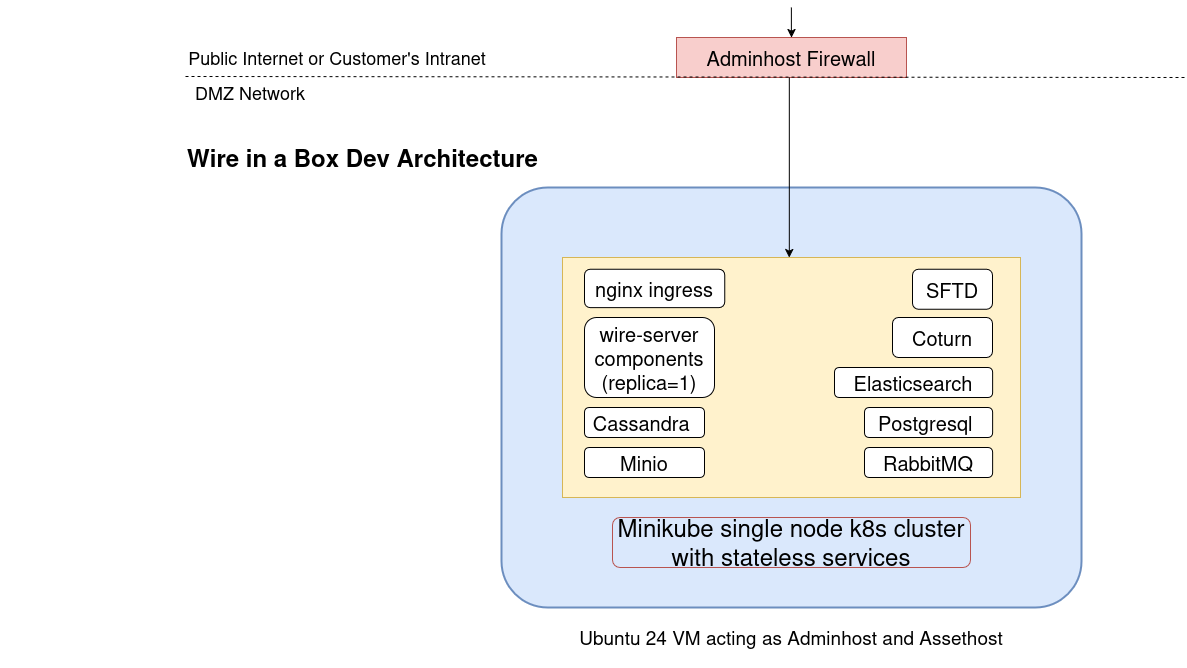
The deployment process is structured into multiple sections within the Ansible playbooks, offering flexibility in execution. It is designed to configure a remote node (referred to as deploy_node), to install Wire with a given domain(referred to as target_domain). These variables must be verified in the file ansible/inventory/demo/host.yml (as explained below) before running the pipeline.
Note: This guide and the shipped playbooks are highly tailored to make testing straightforward on a single VM that has a public IP address.
Using a public IP simplifies obtaining HTTPS certificates (for example via cert-manager HTTP challenges) and making external call configurations during tests.
If you need to deploy in a private or restricted network, the playbooks can be tuned accordingly: skip or enable components via Ansible tags and adjust Helm chart values (see the--tags/--skip-tagsusage below and thevalues/files).
Typically, the deployment process runs seamlessly without requiring any external flags. However, if needed, you can skip certain tasks using their associated tags. For example, if you wish to use your own certificates instead of Let's Encrypt, you can use --skip-tags cert_manager_networking to skip cert-manager deployment and related networking configuration.
For more detailed instructions on each task, please refer to the Deployment Flow section.
Deployment Requirements
- Ansible Playbooks:
- The
ansibledirectory from wire-server-deploy repository - Obtain it using either method:
- Download as ZIP: wire-server-deploy/archive/master.zip (requires unzip, wget)
- Clone with Git:
git clone https://github.com/wireapp/wire-server-deploy.git(requires git)
- The inventory file ansible/inventory/demo/host.yml to update and verify the following variables (required unless noted optional):
- ansible_host: aka deploy_node i.e. IP address or hostname of VM where Wire will be deployed (Required)
- ansible_user: username to access the deploy_node with sudo access (Required)
- ansible_ssh_private_key_file: SSH key file path for ansible_user@deploy_node (Required)
- target_domain: The domain you want to use for wire installation eg. example.com (Required). Check How to set up DNS records for more details.
- wire_ip: Gateway IP address for Wire, could be same as deploy_node's IP (Optional). If not specified, the playbook will attempt to detect it (network ACLs permitting). If your deploy_node is only reachable on a private network, set this explicitly.
- use_cert_manager: Controls TLS certificate management behavior (Optional, default: true)
- true (default): Deploys
cert-managerandnginx-ingress-serviceshelm chart for automatic HTTPS certificate generation via Let's Encrypt. This is the recommended option for most deployments where the target domain is publicly reachable and the deploy_node has outbound internet access. - false: Skips
cert-managerdeployment andnginx-ingress-serviceschart. When disabled, you must manually provide TLS certificates for your domain and configurenginx-ingress-serviceshelm chart manually. - artifact_hash: A default hash is already configured to enable the testing with the latest stable version. Check with Wire support about this value, if a different version is required. Read about more about artifact at Artifact bundle and offline deployment and Offline bundle and alternative chart-only deployment for an alertnative approach.
Internet connectivity requirement: While the Wire services and other related components can be installed without continuous internet access (Thanks to the Artifact), this WIAB Dev playbook assumes that the deploy_node has outbound internet connectivity during installation to provision a k8s cluster. It downloads tooling such as Minikube, Docker, kubectl, Python packages, and system packages from public repositories, and (if
use_cert_manager=true) contacts Let’s Encrypt via cert-manager to obtain certificates. If you must operate in a fully offline environment, consider using WIAB Staging or Production with offline artifacts instead.
Getting Started
Step 1: Obtain the ansible directory
Choose one method to download the wire-server-deploy repository:
Option A: Download as ZIP
Option B: Clone with Git
Step 2: Configure your deployment
Edit the file ansible/inventory/demo/host.yml as explained in Requirements to set up your deployment variables.
Step 3: Run the deployment
Check Custom Installation if you already have a k8s cluster and don't want to follow the full process.
Deployment Flow
The deployment process follows these steps as defined in the main playbook:
1. Wire IP Access Verification (Always Runs)
- Imports verify_wire_ip.yml to check
wire_ipaccess - Always runs - This step is crucial for identifying network ingress and cannot be skipped
- Sets up variables (facts) for Kubernetes nodes based on the Minikube profile
- If
wire_ipis not already specified, the playbook attempts to detect it and saves it on the node
2. DNS Verification
The playbook starts by verifying DNS records to ensure proper name resolution: - Imports verify_dns.yml - Can be skipped using --skip-tags verify_dns - Checks How to set up DNS records for more details.
3. Package Installation
- Imports install_pkgs.yml to install required dependencies
- Can be skipped using
--skip-tags install_pkgs - Versions can be defined in the ansible inventory file
ansible/inventory/demo/host.yml
Packages Installed: - Binaries: - Helm - Minikube - kubectl
- APT Packages:
- jq (JSON query tool)
- python3-venv (Python virtual environments)
- docker-ce (Docker Container Engine)
- containerd.io (Container runtime)
Virtual Environment Approach: Python packages are installed in an isolated virtual environment at
/opt/ansible-venvinstead of system-wide installation. This eliminates conflicts with system Python packages and respects PEP668 constraints on Ubuntu 24.04.
4. SSH Key Management (Automatic Dependency)
- Imports setup_ssh.yml to manage SSH keys for Minikube node and SSH proxying
- Dependency task: This task has no tag and runs automatically when
minikube,asset_host, orseed_containersare selected (when any component that needs it is selected) - Cannot be run independently or skipped manually - it's controlled entirely by dependent components
5. Minikube Cluster Configuration
- Imports minikube_cluster.yml to set up a Kubernetes cluster using Minikube
- All minikube configurable parameters are available in host.yml
- Can be skipped using
--skip-tags minikube
6. IPTables Rules
- Imports iptables_rules.yml to configure network rules on deploy_node
- Configures network forwarding and postrouting rules to route traffic to k8s node
- Runs automatically with
--tags minikube - Can be skipped using
--skip-tags minikube
7. Wire Artifact Download
- Imports download_artifact.yml to fetch the Wire components
- Required to download all artifacts needed for further installation
- Can be skipped using
--skip-tags download
8. Minikube Node Inventory Setup (Automatic Dependency)
- This setup has no tag and runs automatically when
asset_hostorseed_containersare selected - Adds Minikube node(s) to Ansible inventory dynamically
- Extracts internal IP addresses from all Kubernetes nodes
- Configures SSH proxy access to cluster nodes
9. Asset Host Setup
- Imports setup-offline-sources.yml to configure the asset host
- Offers Wire deployment artifacts as HTTP service for installation
- Can be skipped using
--skip-tags asset_host
10. Container Seeding
- Imports seed-offline-containerd.yml to seed containers in K8s cluster nodes
- Seeds Docker images shipped for Wire-related Helm charts in the Minikube K8s node
- Can be skipped using
--skip-tags seed_containers
11. Wire Helm Chart Values Preparation
- Imports wire_values.yml to prepare Helm chart values
- Updates configurations for:
- Wire services (domain names, IP addresses)
- SFT configuration (node affinity, domain settings)
- Coturn (IP addresses, node affinity)
- Ingress controller (node affinity)
- TLS/cert-manager settings
- The playbook backs up existing values files before replacing them
- Uses idempotency checks to avoid unnecessary updates
12. Wire Secrets Creation
- Imports wire_secrets.yml to create required secrets for Wire Helm charts
- Generates:
- Ed25519 cryptographic keys for zAuth
- Random strings for security credentials
- PostgreSQL credentials and Kubernetes secrets
- The playbook is idempotent: won't regenerate secrets if they already exist
- If existing secret files are present, the playbook backs them up before replacing them
- Can be skipped using
--skip-tags wire_secrets
13. Helm Chart Installation
- Imports helm_install.yml to deploy Wire components using Helm
- These charts can be configured in host.yml
- Deploys core charts: fake-aws, smtp, rabbitmq, databases, postgresql, reaper, wire-server, webapp, and more
- Deploys optional charts: cert-manager, wire-utility, kube-prometheus-stack (if configured)
- Reports deployment status and pod health
- Can be skipped using
--skip-tags helm_install
Cert Manager Hairpin Networking Configuration (WIAB Dev): - When use_cert_manager is true, automatically configures hairpin (NAT) behavior on the host so workloads (pods) can reach external/public IPs that resolve back to the same node - These rules ensure that pods in the Minikube cluster can reach https://<domain> even when DNS resolves to the same host's public IP address. - This hairpin behaviour is required for HTTP-01 challenges used by Let's Encrypt in a single-node setup where ingress and workloads share the same node.
14. Temporary Cleanup
- Locates all temporary SSH key directories created during deployment
- Stops
serve-assetssystemd service ondeploy_node - Can be skipped using
--skip-tags cleanup
Ansible notes
- Tag-Based Execution with Dependency Protection: The playbook uses a hybrid approach where main components have tags for user control, while dependency tasks have no tags and are controlled automatically through
whenconditions. This prevents accidental skipping of critical dependencies while maintaining a clean user interface. - You can use Ansible tags to control the execution flow of the playbook. You can run specific tasks using
--tagsor skip specific tasks using--skip-tagsas explained in the Deployment Flow section. By default, if no tags are specified, all tasks will run in sequence.
In case of timeouts or any failures, you can skip tasks that have already been completed by using the appropriate tags. For example, if the Wire artifact download task fails due to a timeout or disk space issue, you can skip the earlier tasks and resume from download:
-
All the iptables rules are not persisted after reboots, but they can be regenerated by running just the minikube setup (and
cert_manager_networkingif required) or restored from the/home/ansible_user/wire-iptables-rules/rules_post_wire.v4file. -
The playbook is designed to be idempotent, with tags for each major section
- Temporary SSH keys are created and cleaned up automatically
- The deployment creates a single-node Kubernetes cluster with all Wire services
Main Component Tags
The following tags are available for controlling playbook execution:
| Tag | Description | Automatic Dependencies | Skippable |
|---|---|---|---|
verify_dns | DNS record verification | None | Yes (--skip-tags verify_dns) |
install_pkgs | Package installation | None | Yes (--skip-tags install_pkgs) |
minikube | Minikube cluster setup | SSH keys setup, IPTables rules | Yes (--skip-tags minikube) |
download | Wire artifact download | None | Yes (--skip-tags download) |
asset_host | Asset host configuration | Minikube node inventory setup | Yes (--skip-tags asset_host) |
seed_containers | Container seeding | Minikube node inventory setup | Yes (--skip-tags seed_containers) |
wire_values | Setup Wire Helm values | None | Yes (--skip-tags wire_values) |
wire_secrets | Create Wire secrets | None | Yes (--skip-tags wire_secrets) |
helm_install | Helm chart installation + cert-manager hairpin networking | None | Yes (--skip-tags helm_install) |
cert_manager_networking | Cert Manager hairpin networking | None | Yes (use_cert_manager=true) |
cleanup | Temporary file cleanup | None | Yes (--skip-tags cleanup) |
Usage Examples
- Run full deployment:
ansible-playbook -i ansible/inventory/demo/host.yml ansible/wiab-demo/deploy_wiab.yml - Run complete minikube setup:
ansible-playbook ... --tags minikube(automatically includes SSH setup and IPTables) - Run only helm installation:
ansible-playbook ... --tags helm_install - Run asset host setup:
ansible-playbook ... --tags asset_host(automatically includes Minikube node inventory) - Skip DNS verification:
ansible-playbook ... --skip-tags verify_dns - Run everything except download:
ansible-playbook ... --skip-tags download - Quick helm values and secrets update:
ansible-playbook ... --tags wire_values,wire_secrets - Resume from artifact download:
ansible-playbook ... --skip-tags verify_dns,install_pkgs,minikube
Custom installation
If you already have a working Kubernetes cluster and prefer to use it instead of creating a local Minikube node, you can skip most of tasks like Minikube creation, container seeding etc, and run only the Helm chart installation tasks (tags wire_values, wire_secrets and helm_install). However, the offline bundle is still required to obtain the charts and the docker image archive(s).
Offline bundle and alternative chart-only deployment
The deployment playbook downloads an offline bundle that contains:
- Helm chart tarballs (the charts used by the deployment)
- Docker/container image archives (used to seed Minikube/node container runtime)
- Helper scripts such as
bin/wiab-demo/offline_deploy_k8s.shwhich are sourced during the playbook.
How to access the helm charts and container images: 1. Download the artifact using the ansible tag download. 2. Extract charts from the bundle and point Helm to the extracted chart directories 3. Load container images into your cluster from the image archive, so that pods can find the images locally
Typical steps to load images manually (examples — adapt for your runtime):
Note: Optionally the steps
10. Asset Host Setupand11. Container Seedingcan also perform these image-extraction and loading steps for you:setup-offline-sources.ymlwill unarchive and host the images via a simple HTTP asset host, andseed-offline-containerd.ymlwill pull/load those images into Minikube node. Those playbooks are tuned for Minikube but can be adapted to work with your own cluster by creating an appropriate inventory and adjusting paths.
kubeconfig path used by Helm in this deployment
If you are using your own Kubernetes cluster instead of Minikube, ensure that the kubeconfig for your cluster is available at "/home/{{ ansible_user }}/.kube/config" before running the helm_install step.
Edit the helm chart values and secrets manually
The playbook generates Helm values and secrets files under {{ ansible_user_dir }}/wire-server-deploy/values/ (for example values/wire-server/values.yaml and values/wire-server/secrets.yaml). These files can be edited manually before running the helm_install step if you need to change chart values or secrets.
Trying Things Out post installation
At this point, wire-server installation should be working. If not, refer to the Troubleshooting section below.
Can you reach the nginz server?
Can you access the webapp? Open https://webapp.
Troubleshooting
Why is my ansible-playbook failing?
- Check the error message and review the Requirements section to confirm that all requirements are met.
- See Ansible Notes to re-run only the failing tasks.
- If
ansible-playbookfails at the last step of Helm Chart Installation, proceed to Are Wire services running fine?.
What to do if ansible-playbook finished successfully but still unable to access Wire?
SSH into the deploy_node with user ansible_user and continue with the following steps.
Which version am I on?
There are multiple components that together form a running Wire-server deployment. The definitions for these can be found in the file /home/ansible_user/wire-server-deploy/versions/containers_helm_images.json after downloading the archive.
Is networking working fine?
- Verify that the Network Access Requirements are met for the deploy_node. Check the verbose (-vvvv) output from the
ansible-playbookcommand for the Wire IP Access Verification. - Ensure that DNS Requirements has been followed. Check the verbose (-vvvv) output from the
ansible-playbookcommand for the DNS verification step. - Check if iptables rules from Wire installation are in place using the following command:
- If they are not visible or if you are unable to access the Wire services, refer to Ansible Notes to reset the iptables rules.
How to check the status of minikube k8s cluster or get access to kubectl?
- Check if minikube is running or not:
- Check if kubectl is working with the config from minikube or not:
- If you are unable to access the k8s cluster, try reinstalling minikube using Minikube Cluster Configuration with the required tags.
Are Wire services running fine?
Start by checking the state of all the pods, assuming that kubeconfig is available in your environment:
And look for any pods that are not Running. Then you can:
and/or:
- If Wire pods or datastore pods are failing due to Docker image issues, try running some of the steps again using Container Seeding and then run Helm Chart Installation.
Confirm if datastore services are working?
Wire-in-a-Box relies on several backend datastore services to function properly. If you experience issues with service connectivity or user operations, you can use wire-utility to troubleshoot and validate the health of these services.
Available datastore services to check: PostgreSQL, Cassandra, Elasticsearch, RabbitMQ, MinIO and Redis. Note - Deployed services can differ based on the Wire backend version deployed.
Using wire-utility for diagnostics:
If wire-utility was successfully deployed (see Helm Chart Installation task and ansible inventory demo/host.yml), you can leverage it to inspect and validate all datastore services. Wire-utility provides comprehensive tooling for: - Querying datastore status and connectivity - Running diagnostics to identify service-level issues - Troubleshooting authentication and access problems
For detailed instructions on using wire-utility and all available diagnostic commands, refer to the wire-utility tool documentation.
Quick health check:
If datastore pods are consistently failing, consider redeploying them using the appropriate Ansible tags while keeping application pods intact.
How to clean everything and start from a clean state?
- Refer to Cleaning/Uninstalling Wire-in-a-Box.
- Once cleaned, continue with the installation process again.
Nothing helped, still struggling to get Wire up?
- Collect the following information and file a ticket with us:
artifact_hashfromansible/demo/host.yamlfrom your setup where you made changes.- Error logs from Ansible or Wire-services or k8s pods.
- Description of the error.
- Create a GitHub issue here and we will do our best to get it fixed.
Cleaning/Uninstalling Wire-in-a-Box
The cleanup playbook uses a safe-by-default approach with the special never tag - nothing is destroyed unless you explicitly specify tags. This prevents accidental destruction of your deployment.
Basic Usage
No destruction by default:
Explicit destruction required:
Available Cleanup Tags
| Tag | Description | What Gets Destroyed |
|---|---|---|
remove_minikube | Stops and deletes the Kubernetes cluster | Minikube cluster, all pods, services, data |
remove_packages | Removes installed packages | Helm binary, Minikube binary, kubectl, Docker (docker-ce, docker-ce-cli, containerd.io), APT packages (jq, python3-pip, python3-venv, python3-full), Python libraries (kubernetes, pyyaml), Docker configuration (GPG key, repository) |
remove_iptables | Restores pre-installation network rules | All Wire-related network forwarding rules |
remove_ssh | Removes generated SSH keys | Wire-specific SSH keys from deploy node |
remove_artifacts | Deletes downloaded deployment files | Wire artifacts, tarballs, temporary files |
clean_assethost | Stops asset hosting service | Asset hosting service and related files |
Common Cleanup Scenarios
Quick cleanup after testing:
Complete cleanup:
Network cleanup only:
Development workflow:
Package cleanup:
Safety Features
- Nothing runs by default: The playbook requires explicit tags to perform any destruction
- Granular control: You choose exactly what to destroy
⚠️ Warning: Package removal (remove_packages) may affect other applications on the server. This includes: - Docker and container runtime (containerd) - Python libraries and development tools - System utilities (jq)
Use with caution in shared environments where these tools may be needed by other services.